
Good morning everyone.
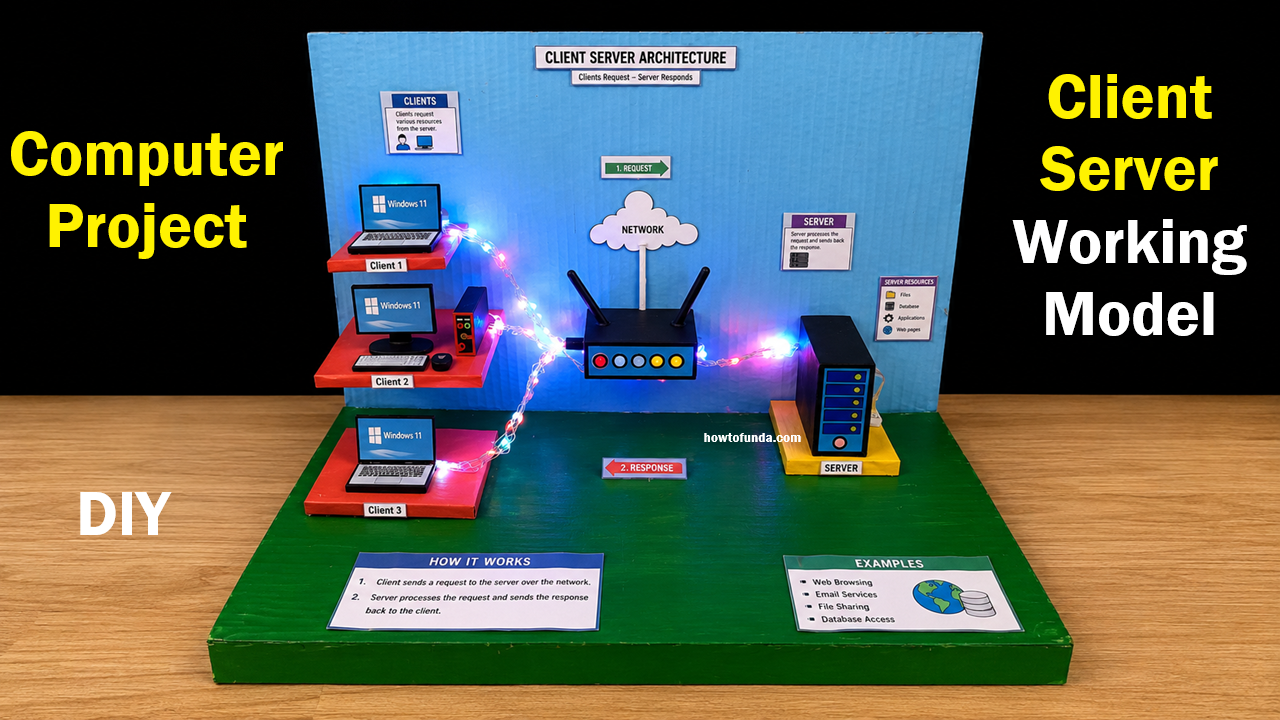
Today I am going to explain my computer science project on “Client Server Working Model.” This DIY working model helps us understand how computers communicate with each other through a network using the client-server architecture.
Client-server architecture is one of the most important concepts in computer networking. It is widely used in:
- Internet services
- Websites
- Banking systems
- Email services
- Online gaming
- Cloud computing
This project demonstrates how clients send requests to a server and how the server processes and sends responses back to the clients.
What is Client-Server Architecture?
Client-server architecture is a network model in which:
- A client requests services or data.
- A server provides services, resources, or data.
The communication happens through a network such as the internet or a local area network (LAN).
For example:
- When we open a website, our computer acts as the client.
- The web hosting computer acts as the server.
The server receives the request, processes it, and sends the required webpage back to the client.
Explanation of the Working Model
In this model, we can see:
- Multiple client computers
- A network router
- A server system
- LED lights showing communication
The glowing LED lights represent the transfer of data between the clients and the server.
Parts of the Model
1. Clients
On the left side of the model, there are three client computers labeled:
- Client 1
- Client 2
- Client 3
Clients are devices that request data or services from the server.
Examples of clients:
- Computers
- Laptops
- Smartphones
- Tablets
The clients send requests through the network.
2. Network Router
The router in the center represents the network connection between clients and the server.
The router:
- Transfers data packets
- Connects devices
- Controls communication
- Helps data travel between systems
In real life, routers are used in homes, offices, and internet networks.
3. Server
On the right side, the server system stores data and resources.
The server:
- Receives client requests
- Processes information
- Sends responses back
Servers may store:
- Files
- Databases
- Websites
- Applications
- Emails
The server is the main control system in the network.
Working of the Model
The project works in the following steps:
Step 1 – Client Sends Request
The client computer sends a request through the network.
Example:
- Opening a website
- Downloading a file
- Sending an email
Step 2 – Request Travels Through Network
The router transfers the request to the server.
The LED lights in the model show the flow of data.
Step 3 – Server Processes Request
The server receives the request and processes it.
It searches for the required information or service.
Step 4 – Server Sends Response
After processing, the server sends the response back to the client.
The client receives the requested data successfully.
Real-Life Applications
Client-server systems are used in:
- Web browsing
- Banking systems
- Email services
- Online shopping
- Social media
- Cloud storage
- School and office networks
Almost every online service today works on the client-server model.
Materials Used
This DIY model is made using:
- Cardboard
- LED lights
- Battery
- Wires
- Toy laptops/computer cutouts
- Router model
- Paint and glue
How to Make the Model
Step 1 – Prepare the Base
Take a cardboard base and background sheet.
Step 2 – Create Client Systems
Make small computer models using cardboard.
Step 3 – Make the Router and Server
Create router and server models using boxes and colors.
Step 4 – Connect LED Lights
Use LED lights and wires to represent data communication.
Step 5 – Add Labels
Label the parts clearly for better understanding.
Advantages of the Project
- Easy to understand networking concepts
- Interactive and attractive model
- Improves computer science knowledge
- Helps students learn practically
- Suitable for science exhibitions
Educational Importance
This project helps students:
- Understand computer networks
- Learn internet communication
- Explore server technology
- Improve STEM learning skills
It combines computer science with creativity and practical demonstration.
Conclusion
In conclusion, this Client Server Working Model is an educational and creative computer science project that explains how clients and servers communicate through networks.
The model demonstrates the process of sending requests and receiving responses using a simple and visual setup. It helps students understand important networking concepts used in real-life internet systems.
This project is highly useful for school science exhibitions and computer projects because it combines technology, creativity, and practical learning.