

Introduction
In today’s digital age, computers have become an essential part of our everyday life. They are used in schools, offices, hospitals, banks, industries, and homes. Understanding the basic parts of a computer system is very important for students. A computer works on the simple principle of Input – Process – Output.
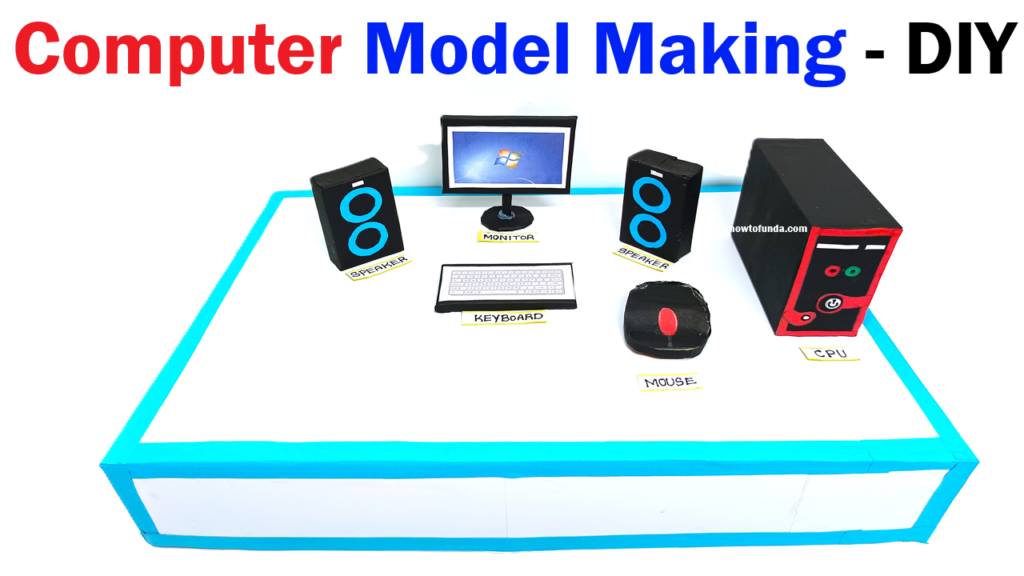
This project is a computer working model made using cardboard and color paper, designed especially for science exhibitions. The model clearly shows the main components of a computer system such as the Monitor, CPU box, Keyboard, Mouse, and Sound System (Speakers). It is a low-cost, eco-friendly, and visually attractive model that helps students learn computer fundamentals through hands-on activity.
Aim of the Project
The main aims of this project are:
- To understand the basic components of a computer system
- To explain the Input–Process–Output cycle
- To create a low-cost computer model using cardboard and color paper
- To promote learning through model-based demonstration
- To develop creativity and recycling habits among students
Materials Used
This model is made using simple and easily available materials:
- Cardboard sheets
- Color paper
- Sketch pens and markers
- Glue and tape
- Scissors and cutter
- Chart paper for labeling
Principle of the Computer System
A computer system works on the IPO principle:
- Input: Data is entered using input devices like keyboard and mouse
- Process: CPU processes the data
- Output: Results are displayed through monitor and speakers
This model visually demonstrates this principle in a simple and effective way.
Description of the Computer Model
The computer model is mounted on a strong cardboard base. Each component is made separately using cardboard and covered with color paper for a neat and realistic appearance. All parts are labeled clearly for easy understanding.
1. Monitor (Output Device)
The monitor is made using a rectangular cardboard frame. The screen area is covered with black or dark blue color paper to represent the display screen. The stand is also made using folded cardboard.
The monitor is an output device. It displays text, images, videos, and results after processing. Everything we see on a computer, such as documents, movies, and games, is shown on the monitor.
2. CPU Box (Processing Unit)
The CPU box is the most important part of the computer system. It is made using a cuboid-shaped cardboard structure and covered with gray or black color paper.
Inside the CPU box are important components like:
- Central Processing Unit (CPU) – the brain of the computer
- Memory (RAM) – stores data temporarily
- Hard Disk – stores data permanently
The CPU processes the data received from input devices and sends the results to output devices. Even though internal parts are not visible, their functions are explained using labels or diagrams pasted on the CPU box.
3. Keyboard (Input Device)
The keyboard is made using flat cardboard. Small rectangular shapes are drawn or pasted to represent keys. Letters, numbers, and symbols are written on the keys using sketch pens.
The keyboard is an input device used to type text, numbers, and commands into the computer. It helps users communicate with the computer.
4. Mouse (Input Device)
The mouse is made using oval-shaped cardboard pieces. Buttons and a scroll wheel are drawn on top using markers.
The mouse is an input device used to point, click, drag, and select items on the screen. It makes computer operation easy and fast.
5. Sound System / Speakers (Output Device)
The sound system consists of two speakers made using cylindrical or rectangular cardboard shapes. Circular designs are drawn to represent speaker grills.
Speakers are output devices. They produce sound output such as music, voice, alerts, and videos from the computer.
Interconnection Between Components
In the model, paper strips or colored wires are used to show connections between components:
- Keyboard and mouse are connected to the CPU (input)
- CPU is connected to the monitor and speakers (output)
This helps students understand how different parts of a computer are connected and work together as a system.
Educational Importance of the Model
- Helps students clearly identify computer parts
- Improves understanding of basic computer concepts
- Encourages learning through visual demonstration
- Develops creativity and problem-solving skills
- Promotes the use of waste and recyclable materials
Advantages of Using Cardboard and Color Paper
- Low-cost and easily available
- Eco-friendly and recyclable
- Safe for students
- Easy to cut, fold, and shape
- Attractive and customizable
Applications of Computer Systems
Computers are used in many fields such as:
- Education and online learning
- Banking and finance
- Hospitals and medical diagnosis
- Communication and entertainment
- Offices and business management
Conclusion
This Computer Model Making Using Cardboard and Color Paper is a simple yet effective way to understand the basic structure and working of a computer system. By using models, students can easily grasp abstract concepts and remember them for a longer time.
The project successfully demonstrates the roles of monitor, CPU box, keyboard, mouse, and sound system in a computer. It also promotes eco-friendly practices by using recycled materials. This model is ideal for science exhibitions, classroom teaching, and computer awareness programs.