

Introduction
Computers play an important role in our daily life, from education and communication to business and entertainment. Every computer system works on the basic principle of Input – Process – Output (IPO). Input devices are used to give data and instructions to the computer, while output devices are used to display or produce the result after processing.
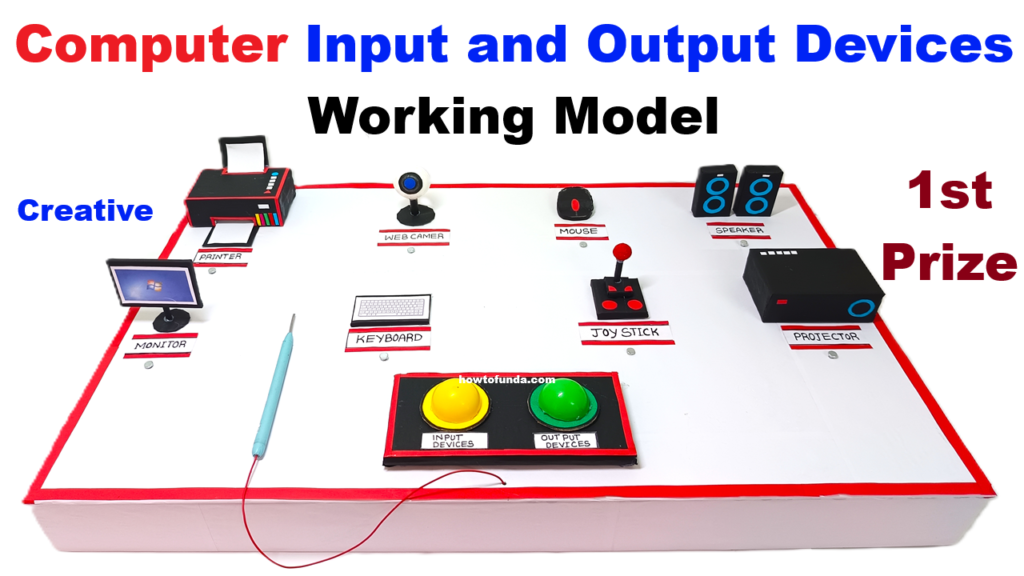
This working model is designed as an interactive quiz-based learning model for science exhibitions. It uses two LED lights to clearly indicate whether a selected device is an Input Device or an Output Device. The model makes learning fun, visual, and easy to understand for students.
Aim of the Project
The aim of this project is to:
- Explain the concept of input and output devices in computers
- Demonstrate the working of common computer peripherals
- Use LED lights to identify input and output devices instantly
- Create an interactive quiz-based learning experience
- Improve conceptual clarity through hands-on demonstration
Principle of the Working Model
The model works on a simple electrical circuit principle. Each device is connected to a switch. When a switch is pressed:
- If the device is an Input Device, the Input LED (Green LED) glows
- If the device is an Output Device, the Output LED (Red LED) glows
This instant visual feedback helps students easily identify and remember the category of each device.
Description of the Model Setup
The model is mounted on a cardboard base. It contains:
- Pictures or small 3D models of computer devices
- Push-button switches below each device
- Two LED lights labeled as:
- Input Device LED
- Output Device LED
- Connecting wires and a battery
The devices included in this model are:
- Keyboard
- Mouse
- Joystick
- Web Camera
- Printer
- Monitor
- Projector
- Speakers
Working of the LED Quiz System
Each device is connected in such a way that only the correct LED glows when its switch is pressed.
Input Devices Section
- Keyboard – When the keyboard switch is pressed, the Input LED glows, showing that a keyboard is used to enter text and commands into the computer.
- Mouse – Pressing the mouse switch lights up the Input LED, indicating that a mouse helps in pointing, clicking, and selecting items on the screen.
- Joystick – The Input LED glows when the joystick switch is pressed, showing that it is used to control movements in games and simulations.
- Web Camera – When selected, the Input LED glows, demonstrating that a webcam captures images and videos as input for the computer.
Output Devices Section
- Monitor – Pressing the monitor switch turns on the Output LED, showing that it displays visual output such as text, images, and videos.
- Printer – When the printer switch is pressed, the Output LED glows, indicating that it produces output in the form of printed documents.
- Projector – The Output LED lights up, showing that a projector displays computer output on a large screen.
- Speakers – Pressing the speakers switch makes the Output LED glow, indicating that speakers produce sound output.
Quiz-Based Learning Feature
This model is designed as a self-learning quiz system. Students are first asked to guess whether a device is an input or output device. After making their choice, they press the corresponding switch. The glowing LED confirms whether their answer is correct.
This approach:
- Encourages active participation
- Improves memory retention
- Makes learning fun and engaging
- Builds confidence in students
Educational Advantages
- Simple and clear demonstration of computer basics
- Suitable for junior and senior students
- Low-cost and easy to construct
- Can be reused for classroom teaching
- Helps in understanding real-life computer applications
Applications of Input and Output Devices
- Input devices help humans communicate with computers
- Output devices help computers communicate results to users
- Used in education, offices, hospitals, gaming, design, and communication
Conclusion
This Computer Input and Output Devices Working Model with LED Quiz System is an effective and interactive way to teach basic computer concepts. By using LED indicators, the model provides instant visual learning and makes the classification of devices simple and interesting.
The project highlights the importance of input and output devices in computer systems and proves that learning can be both educational and enjoyable. This model is ideal for science exhibitions, school demonstrations, and computer awareness programs